Industries · Electrical supply
An electrical supply business serves contractors who bid on jobs. The quote comes first, the order often arrives as a long list for one project, it gets filled over several days as stock comes in, and the price of half of it moves with the price of copper. Easy Books was built for the way that business actually runs.
On this page
From the contractor's bid to the job order
Big orders, filled as stock arrives
A counter and a back office, kept apart
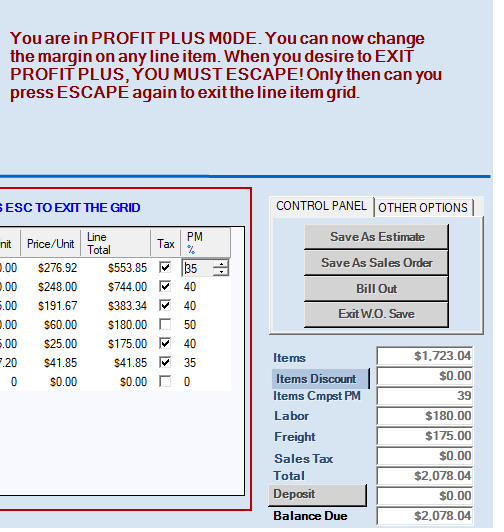
Request the manualA contractor asks for a price on a job list before bidding. Write it as an estimate in the same window you use for every sale, with Profit Plus showing your margin on every line and on the whole list as you price it. If the contractor wins the job, the estimate becomes a sales order with one click — no retyping a sixty-line list.
A job order rarely ships all at once. Every line shows the quantity on hand as you enter it, and anything you can't supply today becomes a back order automatically. Ship what you have, bill it out, and the rest stays open against the job until it arrives.
That's where the PO Wizard earns its keep. For every stock item it weighs what's on the shelf, what's already on order, what's committed to open customer orders, your minimum and maximum levels and the pack size the manufacturer ships in. Then it writes the purchase orders in seconds. Because it accounts for what it has already ordered, it will never over-order, however often you run it. A contractor's job list is in the next order automatically, and nobody has to remember it. We don't believe another small-business package does this.
Wire, cable and anything else built on copper changes price whenever the metal does, and manufacturers revise their lists accordingly. Re-price a Product Line, in the Utilities menu, lets you choose a vendor and the margin you want — say 35% — and reprices every item from that vendor to deliver it, in one step. Your counter quotes today's prices, not last quarter's.
Most of your customers buy on terms. Payments are posted by clicking the invoices a check covers, with short-pays and overpayments settled in the same screen and no journal entries. Statements go to every customer with a balance in one operation, by print or email, and the receivables aging report shows who to call. A contractor who wants to pay a deposit on a large job can do that too, against the sales order itself.
The counter computer runs the Sales Module: quotes, orders and invoices all day, with part-number search by full number, partial number or description, but no access to payroll or the books. The office runs the Accounting Module. Same database, set up per computer.
Request the manual
We will send you the complete Easy Books User Manual and the Task Map, free and with no obligation. Read them, compare them against whatever you are using now, and judge for yourself whether this is simpler. It takes under a minute to ask.
