Industries · Furniture stores
A furniture store doesn't move a lot of units. It moves expensive ones, often to order, often weeks after the customer has paid a deposit. That puts unusual pressure on three things: knowing what's really available, ordering exactly what's needed, and keeping track of money taken before the goods arrive. Easy Books handles all three in the window you already use to write the order.
On this page
Every piece on the floor costs real money
Special orders and back orders
Deposits taken weeks before delivery
Delivery and assembly on the same invoice
Pricing a big ticket with your eyes open
When the manufacturer raises prices
Request the manualWhen a sofa costs you several hundred dollars, a single item sitting unsold ties up real cash, and a single item you can't supply loses a sale worth far more than its margin. Improving turns and avoiding stock-outs isn't a nice-to-have. It's the business.
The PO Wizard was built for exactly this. For every stock item, it looks at what's on the floor, what's already on order from the manufacturer, what customers have on open orders, your minimum and maximum levels, and the quantity the vendor ships in. Then it writes the purchase orders — in seconds. Because it counts what's already on order, you can run it every day and it will never order the same sofa twice. We don't believe another small-business package does this.
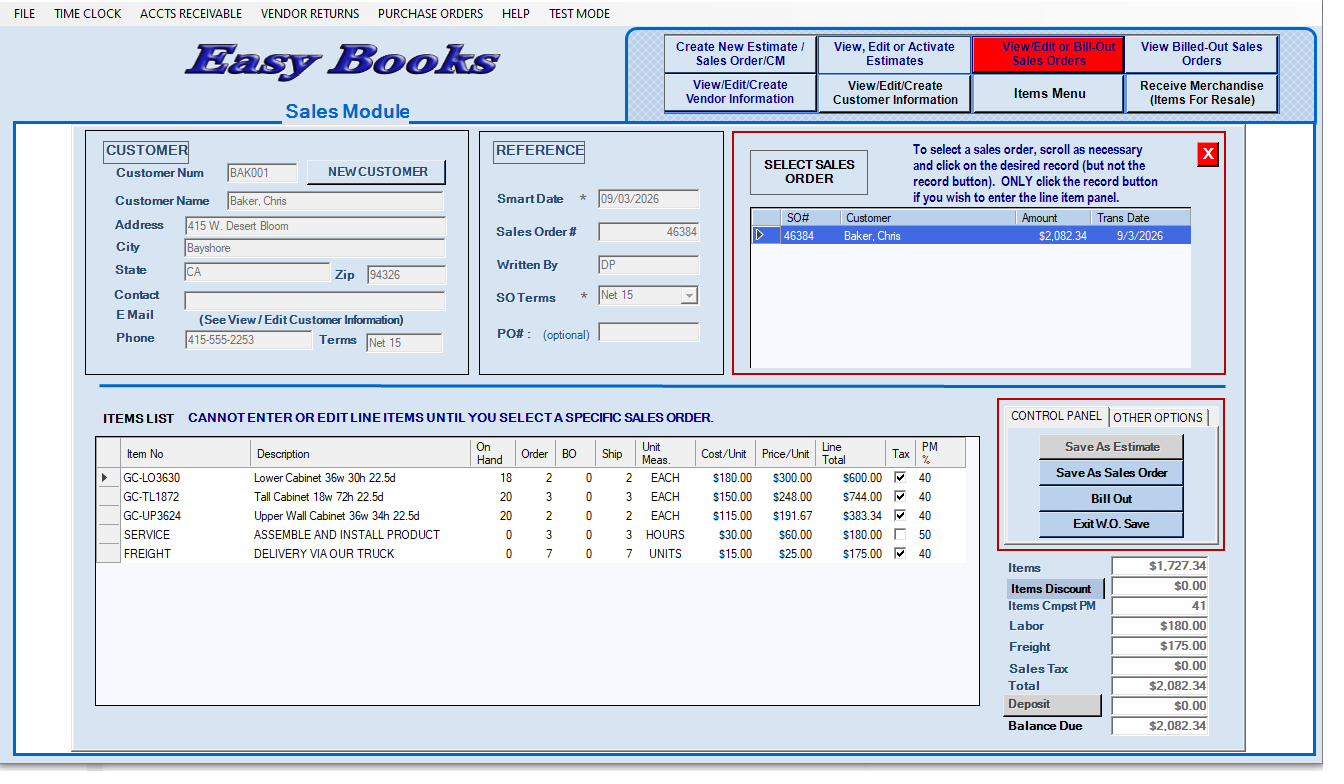
Much of what a furniture store sells isn't on the floor at all. When a customer orders a dining set in a finish you don't stock, Easy Books shows the real on-hand figure on the line while you're writing the order, and raises the back order for anything you can't supply. Run the PO Wizard and that customer's order is part of what it buys — so the special order is placed without anyone having to remember it.
A deposit at the time of sale, another when the order arrives, the balance on delivery. Easy Books lets you take as many deposits as you need against one sales order, straight from the totals panel, with each one shown against the balance due. No journal entries, no separate deposit ledger to reconcile, and if the order is canceled the refund is handled properly.
Delivery, assembly and setup go on the sales order as their own lines — freight and service items sit alongside the furniture but are never counted as stock. Press F2 for a labor line, F3 for freight. The customer gets one invoice for everything, and your margins on the goods aren't muddied by what you charged for the truck.
Customers negotiate on large purchases. Profit Plus shows the margin on every line as you write the order, and the margin on the whole order beneath it. Adjust a price and you watch both move, along with the invoice total, so you know where the floor is before you agree to a discount — not after.
Furniture lines are repriced regularly. In the Utilities menu, Re-price a Product Line lets you choose a vendor and the margin you want — say 42% — and every item from that vendor is repriced to deliver it. One step, not an afternoon with a price list.
Request the manual
We will send you the complete Easy Books User Manual and the Task Map, free and with no obligation. Read them, compare them against whatever you are using now, and judge for yourself whether this is simpler. It takes under a minute to ask.
